nacn.app
What kind of game is it?
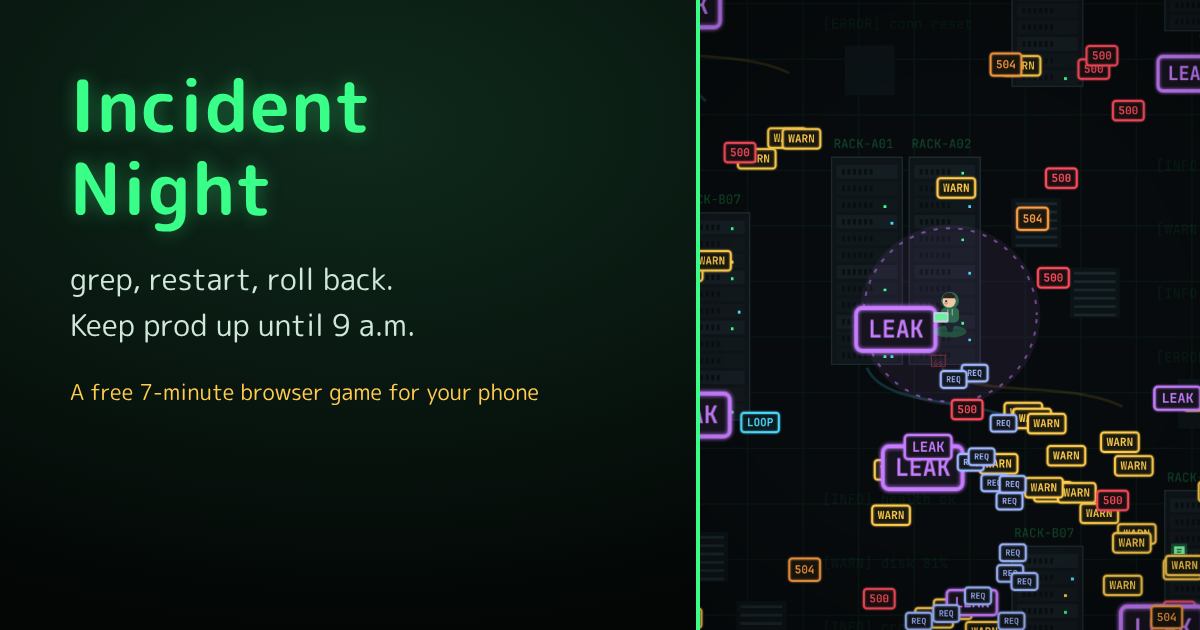
Incident Night turns the night every on-call engineer dreads — the pager goes off at 2 a.m. and the alerts just keep coming — into a whole night of play. You look down on a dark server room with blinking rack LEDs, and alert boxes labelled WARN, 500 and LEAK crowd in on you. You only move with your finger; your commands run automatically, and every time one fires, a line like "$ grep -r ERROR /var/log" scrolls by in the command feed at the bottom left.
Alerts you clear drop resolved tickets. Pick up enough to level up, and time stops while you choose one of three cards: a new command or passive, or an upgrade to one you already have. The in-game clock starts at 2:00 and moves one minute every real second. Your health is your uptime: it starts at 100.00% and drops whenever an alert touches you or a boss's projectiles hit you. Fall below the 99.0% SLA and it's "SLA Breached" — game over. Hold out until 9:00, when your coworker walks in asking "Morning! Anything happen last night?", and you win.
Every run ends with an Incident Report — date, response window, lowest uptime, main cause and the commands you ran — that you can save as an image or share directly.
Features
Six commands that run themselves
grep fires a green laser the way you're moving, piercing every alert in a row (it's your first command). Restart sets off a big blast around you every few seconds, with the screen blinking dark for a moment; Rollback sends a wave in every direction that pushes alerts back; Hotfix fires patches that home in on the nearest alert; Autoscale puts little servers in orbit around you that each shoot nearby alerts (they go down if swarmed and come back after a while); and Rate Limit slows down the alerts around you. Combine them with six passives: Redundancy (damage taken −10%), Runbook (projectiles +1, max Lv2), CI/CD (cooldown −8%), Coffee (move speed +10%), Power Nap (uptime recovers 0.01% per second) and Monitoring Dashboard (ticket pickup range +20%). You can hold four commands and four passives, each up to Lv5.
Command at Lv5 + the right passive = evolution
Get a command to Lv5 while holding its matching passive, and an evolution shows up among your next level-up cards in a gold frame. grep + Monitoring Dashboard becomes Observability, four lasers sweeping around you to scan every direction; Restart + Redundancy becomes Zero-Downtime Deploy, a huge blast followed by a few seconds of invincibility, with no more blackouts; Autoscale + CI/CD becomes Kubernetes, with up to 8 replicas that heal themselves almost instantly; and Hotfix + Runbook becomes Auto-Heal Script, patches that split on every hit and chain to more alerts. Each level-up card lists its partner, and cards whose partner you already have glow green.
The boss wants a status update, then the production DB goes down
The night changes hour by hour. At 3:00 "alerts are triggering alerts," and for an hour every alert you clear splits into two WARNs. Memory leaks grow tougher the longer you leave them, infinite loops circle in on you, and slow, tough Timeouts (504) sometimes drop an energy drink. At 5:00 the mid-boss Boss: "Status Update?" chases you while firing chat bubbles. From 6:00 to 7:00 the morning traffic peak pours in bands of tiny requests — the busiest hour of the night — and at 7:30 a certificate expires and alerts speed up for 30 minutes. At 8:00 comes the final boss, Production DB Down: a giant database that fires "SELECT *" queries in every direction.
Breached the SLA? Your On-call Pay makes the next night easier
Once per run, if you're about to breach the SLA after 7:30, the SRE team joins the call and revives you. After every run you earn On-call Pay — 1 for every 10 alerts resolved and every 6 minutes kept up, plus 80 more for making it to 9:00 — and you can spend it on Books & Study Groups: permanent upgrades like Incident Drills (uptime buffer +10%), Postmortem Culture (damage +6%), Shortcut-Key Study Group (move speed +5%), Tech-Book Club (XP +8%) and Design Review (rerolls +1), five levels each. Three more characters — the Veteran SRE, the Full-Stack Engineer and the CTO, who now and then gets pulled into a board meeting and can't move for 4 seconds — unlock when you keep things running until 5:00, resolve 1,000 alerts in total, and make it to 9:00 once. There's also Tonight's Incident, a daily run where the incident and the number of alerts depend on the weekday (Fridays, "cleaning up after a Friday release," are the busiest), an Alert Handbook with a line of on-call wisdom for every entry, and 13 achievements, one of them hidden.
How a night goes
Here's the night's schedule from the game's How to play page. The alerts you meet and your level-up choices change every time.
| Time | What's happening |
|---|---|
| 2:00 | Your phone rings and the night begins. A handful of WARN alerts drift your way. Red 500 Internal Server Errors join in from 2:30 |
| 3:00 | "Alerts are triggering alerts": for one hour, every alert you clear splits into two WARNs. Memory leaks show up from 3:30 |
| 4:00 | All the nightly batch jobs kick off at once, and WARNs pour in from the edges of the screen. Infinite loops start circling in, and Timeouts (504) join from 4:30 |
| 5:00 | Mid-boss Boss: "Status Update?" Satisfy them by 6:30, or they head back to their next meeting |
| 6:00–7:00 | The morning traffic peak: a request flood pours in as bands from the right, left and top |
| 7:30 | A certificate expires: for 30 minutes the screen turns warning colours and alerts speed up |
| 8:00 | Final boss: Production DB Down, bringing 500 errors along with it |
| 9:00 | Your coworker walks in, and you win. If the DB is still down, the clock freezes at 8:59 and you get 30 seconds to bring it back; after that, your coworkers take over and you win anyway |
In automated test runs (a simple bot that only runs from nearby alerts and grabs tickets, so it plays weaker than a person), 3 of 4 runs with no upgrades breached the SLA between 6:11 and 6:38, during the morning traffic peak. With four upgrades at Lv2, 2 of 4 runs made it to 9:00 and one held out until 8:59. On your first nights, expect to breach the SLA around 6 a.m.; build up your upgrades and land one evolution, and you'll start making it to 9:00.
Tips
- grep fires the way you're moving. Running straight away from a crowd leaves the alerts behind you untouched, so turn towards the thinner parts of the crowd now and then to line them up
- Levelling one command to Lv5 and evolving it beats spreading out. If you're building grep, grab the Monitoring Dashboard early — it also pulls in tickets from farther away
- Don't leave memory leaks alone: they grow bigger, tougher and hit harder over time. Clear them while they're small
- Get ready for the 6:00 morning traffic peak before it starts. An Escalation pulls in every ticket on the screen, and Maintenance Mode keeps your uptime from dropping for 8 seconds
FAQ
- Does it cost anything?
- It's free. No sign-up or app install needed.
- How long does a run take?
- About 7 minutes if you hold out from 2:00 to 9:00. If you breach the SLA earlier, the run ends there. You can pause anytime.
- Can I play in other languages?
- Yes, it also comes in Japanese, Traditional Chinese, Spanish and Korean.
- Can I play on a computer?
- Yes. Move with WASD, the arrow keys or hjkl, press Esc (or P) to pause, and press R to hide the HUD for recording. On the level-up screen you can also press 1–3.
- Is this how real incident response works?
- No. The company, systems and alerts are made up and exaggerated for the game, and no real services are named. It isn't advice on how to handle real incidents — follow your own team's runbooks and procedures.
- Can I share my results?
- Yes. The results screen is an Incident Report you can save as an image, or share directly on devices that support it. Your best score in Tonight's Incident shows on the title screen, so it's easy to compare with friends.
- Is my data sent anywhere?
- On-call Pay, upgrades, unlocked characters, the Alert Handbook, achievements and best score are saved only in your browser. To understand how people play, we send game starts and results (time reached, alerts resolved, score, level) to Google Analytics, but nothing that identifies you, like your name.
The full list of commands, passives and evolutions, the night's schedule and character unlocks are in How to play.