nacn.app
What kind of game is it?
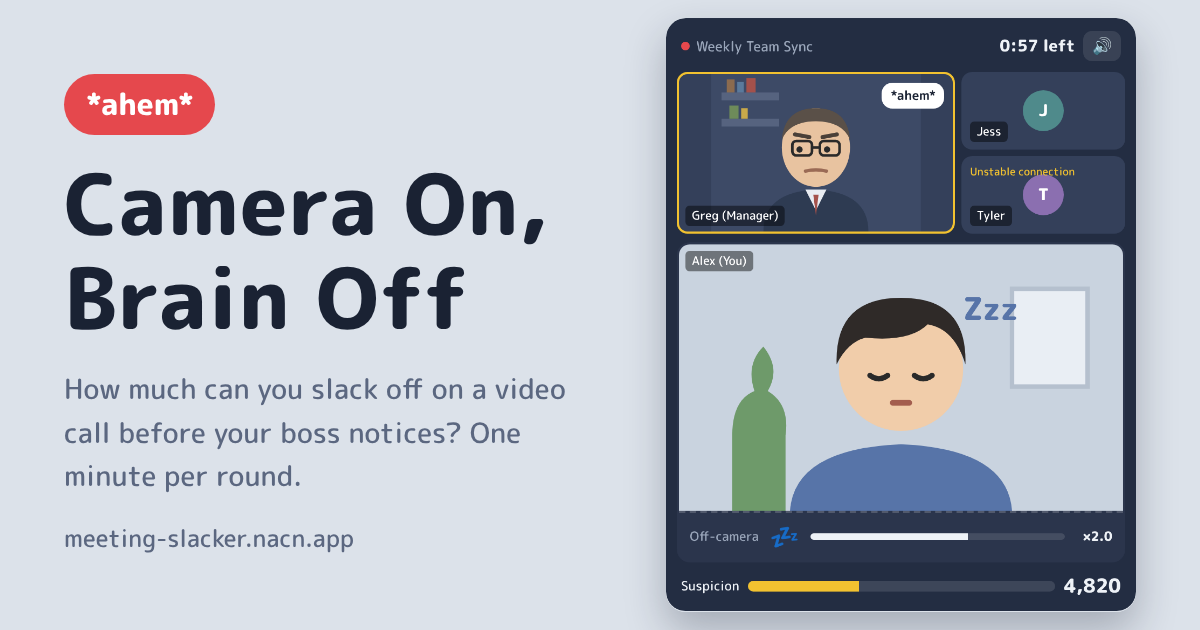
In Camera On, Brain Off, you're Alex, stuck in a one-minute “Weekly Team Sync”, slacking off just out of frame. You only slack off while you hold the big button at the bottom of the screen. Let go, and the you on camera snaps back to a straight face. On a computer, you can hold the Space bar instead.
Your manager Greg fills the big tile on screen. Most of the time he's looking down at his notes, but every so often he goes “*ahem*” and looks right at you. If you're slacking while he's watching, your Suspicion meter climbs, and at 100 you're removed from the meeting. Make it through the full minute to clear the round and get a score for all your slacking, plus a title based on that score.
Features
“*ahem*” means he's about to look
Greg always clears his throat before he looks at you, and his tile lights up yellow. The gap between the “*ahem*” and the look is about 1.3 seconds at the start of the meeting and shrinks to about 0.55 seconds near the end. Sometimes he clears his throat and then doesn't look at all. The chance of that fake-out rises from 20% to 45% as the meeting goes on. You never get caught out of nowhere: it's all about reading him.
Three ways to slack: Snack, Scroll, and Nap
A Snack is worth 60 points a second, and you're back to a straight face the instant you let go. Scrolling your phone is worth 110 points a second and takes 0.18 seconds to put away. A Nap is worth 200 points a second, but it takes 0.5 seconds to wake up, and getting caught napping raises your Suspicion the fastest. Switch between playing it safe and going big as you read the flow of the meeting.
The longer you hold, the more you score
Every 2 seconds you keep holding, your score multiplier goes up by 0.5, to a maximum of ×3.0. On top of that, getting back to a straight face within 0.6 seconds before Greg looks earns a “Close call!” bonus of 250 points. So don't let go the moment you hear the “*ahem*”: the longer you push your luck, the more you score. When the off-camera bar fills up, you also get a completion bonus of 200 to 1,000 points, depending on how you're slacking.
Getting called on, and a chat from Greg
Once per meeting, somewhere between 20 and 40 seconds in, Greg calls on you: “Alex, what are your thoughts on that?” You have 5 seconds to pick a reply. When the meeting ends, you get one of six titles, from “Never Even in the Meeting” to “Mentioned in the Meeting Notes”, along with a chat from Greg. Get removed from the meeting, and what you get is an invite to a 1:1.
An example meeting
Here's how the score moves in the first few seconds of a meeting. (The timing of Greg's throat-clearing and how long he takes to look change a little every time.)
| Time | What you did | Result |
|---|---|---|
| 0–3.9 s | Hold on Snack. At 2 seconds, the multiplier goes up to ×1.5. At 3 seconds, Greg goes “*ahem*”, but you hold on until 3.9 seconds | 60 × 2 s + 90 × 1.9 s = +291 (total 291) |
| About 4.3 s | Greg looks at you. You were back to a straight face 0.4 seconds earlier | Close call! +250 (total 541) |
| After Greg goes back to his notes | Switch to Nap and hold for 2 seconds | 200 × 2 s = +400 (total 941) |
| Somewhere between 20 and 40 s | Greg calls on you, and you answer “Great point, I totally agree”. | +300 |
Under 1,500 points, your title is “Way Too Productive”. At 9,500 or more, it's “Never Even in the Meeting”. If you answer “Wait, what are we talking about?” when called on, or don't reply within 5 seconds, your Suspicion jumps by 35.
Tips for slacking like a pro
- Start with Snack to get a feel for the gap between the “*ahem*” and the look. With a snack, you're back to a straight face the moment you let go
- Waking up from a Nap takes 0.5 seconds. In the second half of the meeting, Greg looks only about 0.55 seconds after clearing his throat, so let go as soon as you hear it
- The off-camera bar stays where it is when you let go. Fill it a little at a time with short holds, and you can reach the 1,000-point bonus for a Nap (switching how you slack empties the bar)
- Between 20 and 40 seconds, keep your Suspicion low so you're ready when Greg calls on you
How this game came together
Something everyone has done
Slacking off just below the camera during a video call needs no explanation, and the goal was a short game you want to retry again and again. You can only slack while you hold the button, which gives it the tension of Red Light, Green Light, and the greedier you get the riskier it is: snacks are safe but score little, while napping is risky but scores big.
No cheap game overs
The boss always clears his throat before he checks the camera, so you're never caught without warning. Instead, as the meeting goes on, the gap between the cough and the look shrinks (from about 1.3 seconds to about 0.55), and he fakes you out more often.
A results screen worth sharing, even when you're caught
You get more than a score: a title ranging from "Name in the meeting minutes" to "Not even in the minutes," plus a chat message from the boss. Get kicked out and you'll find a one-on-one invite waiting. The ways to slack change by country, like bubble tea in Taiwan or triangle kimbap and webtoons in Korea, and "Today's meeting" gives everyone the same meeting on the same day.
FAQ
- Does it cost anything?
- It's free. No account or app install needed.
- How long does one round take?
- Each meeting lasts one minute. If you're removed from the meeting, the round ends right there.
- Does it make sound?
- Yes, there are sound effects like the throat-clearing and ambient sounds. You can turn them off with the button at the top right of the meeting window. Greg's tile colour and speech bubble also show when he clears his throat, so you can play with the sound off.
- Which languages can I play in?
- Seven: English, Japanese, Traditional Chinese, Korean, Spanish, Portuguese (Brazil), and Indonesian. Each language has its own boss and coworker names and its own ways to slack off, matched to that country.
- Can I share my result?
- Yes. Tap “Share result” on the result screen to share your title and score as text. If your browser has no share menu, the text is copied instead.
- Is my data sent anywhere?
- No. Only your personal best and your sound effects setting are saved, in your own browser. Nothing from a meeting in progress is saved, so reloading the page starts you over.
For the numbers behind each way to slack, and more on Suspicion and getting called on, see How to play on the game's site.